
An issue has been identified in version 2027.a of Arquimedes, which causes both the "Assign items and extract quantities" dialog box and Arquimedes itself to close unexpectedly, without displaying any error messages.
This issue occurs when there is an incorrect breakdown of comments in the "Quantity lines 'To be deducted'" for certain categories of Revit elements, such as doors, windows, walls or roofs.
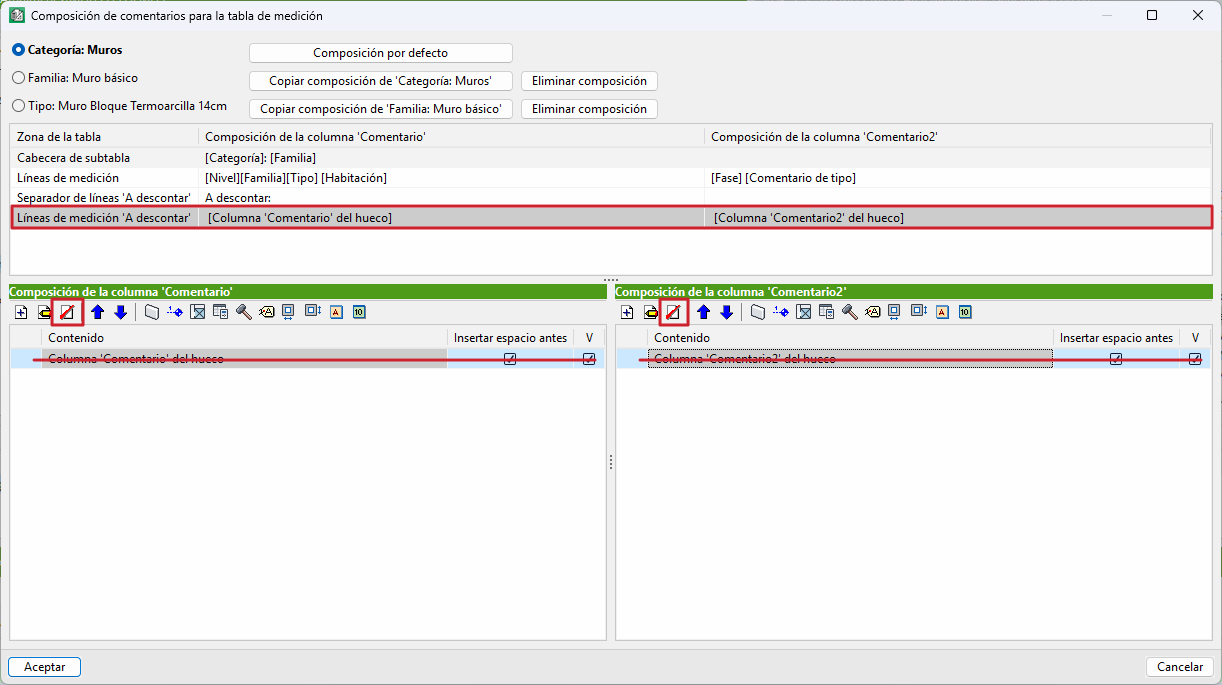
Specifically, it must be checked whether the composition includes the following elements:
- "Column 'Comment' of the opening".
- "Column 'Comment2' of the opening".
Although this issue has been rectified in version 2027.b, it may still occur in projects opened with version 2027.a that retain that configuration.
Solution
To prevent the program from closing unexpectedly, you must clear the comment field for the "Quantity lines 'To be deducted'" in the relevant categories, so that it is left blank.
To do this, from the "Assign items and extract quantities" dialog box, follow these steps:
- Select a type belonging to the relevant category.
- Click the "Comments composition for the quantities table" button.
- In the window that opens, select the "Category" option.
- Select the "Quantity lines 'To be deducted'" row
- Using the "Delete" option on each of the lower panels, delete the following content:
- In "Composition of the 'Comment' column", delete the line "Column 'Comment' of the opening".
- In "Composition of the 'Comment2' column", delete the line "Column 'Comment2' of the opening".
- Check that both fields are empty and click "Accept".
The procedure must be repeated for all affected categories. Once these changes have been made, you can proceed with the allocation of items and extraction of quantities.