


Open BIM – Revit add-in installation status panel
The status panel is an informational and management tool that lets you view the versions of Revit installed on the computer and check which versions of the Open BIM - Revit add-in are installed or available for each of them.
From this panel, you can also install a specific version of the add-in on top of an existing version of Revit, without having to download the installer again.
Accessing the status panel
After installing the Open BIM – Revit add-in using the standard procedure, the status panel can be opened by running the "Open BIM – Revit add-in.exe" file, located in the add-in’s installation directory. Normally, this .exe file is located at the following path: C:\CYPE Ingenieros*Version*\Open BIM – Revit add-in.
The file must be run without administrator permissions, as the add-in installation path depends on the Windows user under which it is run. If opened as an administrator, the add-in may be installed in a different profile to the one used by Revit and, as a result, may not appear as available when Revit is launched using your usual account.
Information available
The status panel displays the following information for each version of Revit:
 Revit version and add-in version installed
 Revit version and add-in version not installed
 Revit version installed and add-in version not installed
 Revit version currently running
- Installed version of Revit, including the main version and any updates or patches installed.
- Add-in installation directory, used as a communication point between the add-in and Revit. The contents of this directory must not be modified manually.
- Installed version of the add-in for each detected version of Revit.
- Available version of the add-in that can be installed.
- "Install" option, available when it is possible to install a specific version of the add-in on an installed version of Revit.
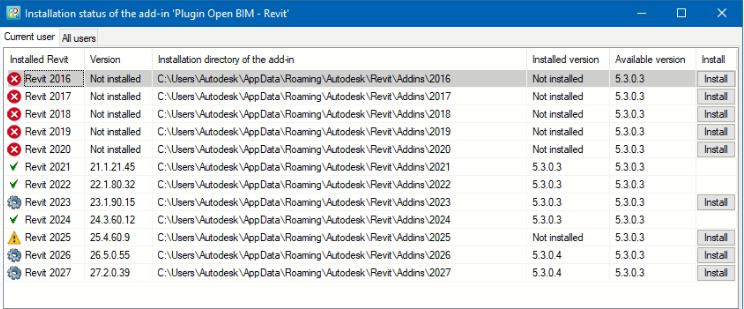
Note: The status panel is for information purposes only, with the exception of the "Install" column.
Installing a version of the add-in from the status panel
To install the Open BIM - Revit add-in for a specific version of Revit, click the "Install" button in the relevant row.
This way, the panel allows you to install the available version of the add-in directly onto the selected version of Revit, without needing to download the installer separately.
Troubleshooting installation issues
If, following the initial installation, the Open BIM – Revit add-in is not available or is experiencing an installation issue, you can open the status panel and use the "Install" option corresponding to the affected version of Revit.
This allows you to reinstall the add-in for that version and may resolve any issues arising from the initial installation. The panel can also be used at any time to check the detected Revit versions and the installed add-in versions.